
- Construction waste tracking apps like Mitti, SmartWaste, and Raken help Peoria contractors log every load, photo, and weigh ticket instead of relying on memory or paper notes.
- Most tracking apps fall into three types: full compliance platforms, daily field-reporting tools, and municipal upload systems tied to a permit.
- A weigh ticket, material type, and destination facility should be logged for every haul to build a usable diversion record.
- OSHA’s waste disposal rule requires scrap and rubbish removal as work progresses, and an app makes that easy to document.
- Pairing a tracking app with a properly sized construction and demolition waste dumpster keeps your logged numbers accurate from the start.
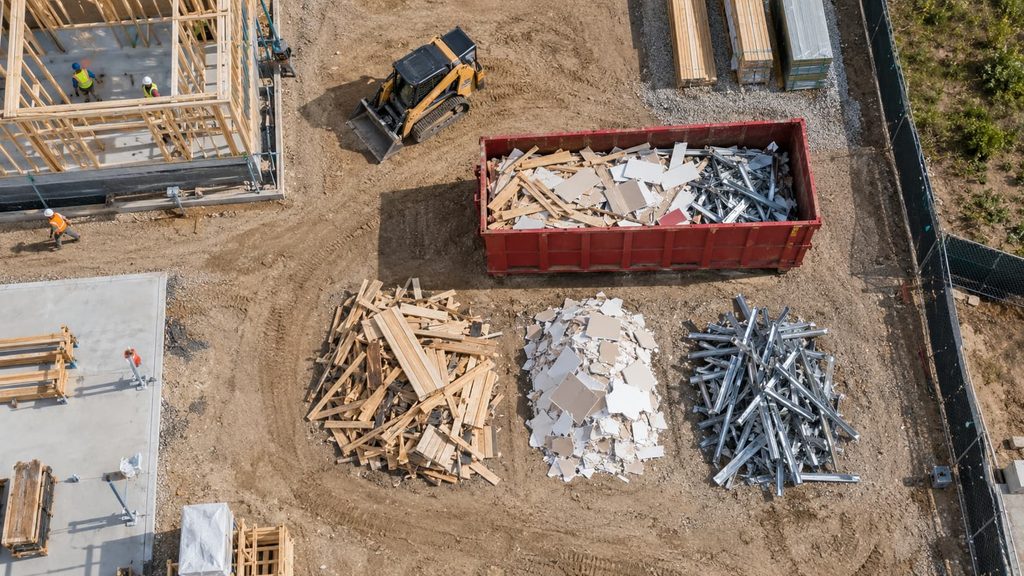
Construction waste tracking apps are mobile tools that let contractors log debris weight, material type, and disposal destination for every load leaving a jobsite, turning scattered paper tickets into one searchable record.
Why Construction Waste Tracking Apps Matter for Peoria Contractors
Every Peoria contractor has a project where the paper waste log went missing, or nobody wrote down which hauler took the last load of drywall. That gap is exactly what construction waste tracking apps fix. Instead of a clipboard in a truck cab, crews log each load on a phone, right when it happens. The record includes what material left the site, how much it weighed, and where it went. For jobs that need to show a diversion percentage to a client, a lender, or a city permit office, that record is the difference between a five-minute report and a week of digging through old receipts.
The stakes are bigger than paperwork. The EPA reports that the U.S. generated roughly 600 million tons of construction and demolition debris in 2018, with demolition work making up more than 90 percent of that total.[1] A single Peoria renovation or teardown adds to that number fast, and a tracking app is how a contractor proves their project handled its share responsibly instead of just guessing.
What a Good Waste Log Actually Needs
A useful waste log is more than a running tally of dumpster pickups. It needs five fields at minimum: the date, the material type, the estimated or actual weight, the hauler or facility name, and whether the load was recycled, reused, or landfilled. Contractors who skip the weight field often find out too late that they’ve blown past a container’s weight limit, which turns into overage fees that a simple log would have flagged early.
Who Actually Uses These Apps Day to Day
On most jobsites, it’s the superintendent or a lead foreman entering data, not the office. That’s why field usability matters more than feature count. An app that takes three taps to log a load gets used every day. An app that needs a desktop login to finish a report gets ignored by Friday.
Top Construction Waste Tracking Apps Compared
Here’s how the leading options stack up for contractors weighing their choices.
| App | Best For | Typical Use |
|---|---|---|
| Mitti (by SafetyCulture) | All-in-one field checklists plus waste modules | Photo evidence, task assignments, compliance reports |
| SmartWaste (BRE Group) | Firms tracking diversion rates and ESG reporting | Scan feature captures delivery and weigh tickets on site |
| Raken | Daily field teams that also need photo documentation | Bin pickups, contamination notes, hauler details in daily reports |
Mitti (by SafetyCulture) builds waste tracking into its broader field-inspection platform. Crews can build custom digital checklists, attach photo evidence to every entry, assign follow-up tasks, and pull analytics dashboards that show diversion trends over time.[2] For a contractor who already uses Mitti for safety walks, adding waste logging is a natural extension rather than a whole new system to learn.
SmartWaste, built by the BRE Group, leans toward firms that need to prove diversion numbers to a client or certification body. Its Scan feature lets a crew member photograph a waste transfer note or delivery ticket, and the app pulls the material type, quantity, and carrier details automatically instead of requiring manual entry.[3] That matters on busy Peoria sites where nobody has time to type in every ticket by hand.
Raken takes a different approach. It’s built first for daily field reporting — weather, manpower, photos, safety notes — and waste tracking rides along inside that same daily report. Crews already using Raken for daily logs can note bin pickups, hauler details, and contamination issues without opening a second app.[4] For superintendents who already live inside Raken every morning, this is often the path of least resistance.
What to Look For Before You Pick an App
Not every app fits every crew. Before committing, weigh these factors against how your Peoria jobsite actually runs.
Weigh Ticket Capture
The best apps let a crew member snap a photo of a weigh ticket and pull the data automatically. This matters because manual data entry is the single biggest reason waste logs fall apart mid-project — someone gets busy, skips a few entries, and the record has holes right when a client asks for a diversion report.
Field Usability Over Feature Count
A platform loaded with dashboards and analytics is worthless if the crew on-site finds it clunky. Test any app with a real load before rolling it out across a project. If it takes longer than logging a paper ticket, it won’t get used consistently.
Compliance With Local and Federal Rules
OSHA’s construction standard requires that scrap lumber, waste material, and rubbish be removed from the immediate work area as work progresses, and that solvent waste and oily rags stay in fire-resistant covered containers until they leave the site.[5] A tracking app doesn’t replace those physical housekeeping duties, but a documented waste log does give a contractor a clear paper trail if an inspector asks how debris was handled during a phased job like the ones detailed in our guide to coordinating waste removal across a phased demolition.
App-Based Tracking vs. Paper Logs
| Factor | Paper Log | Tracking App |
|---|---|---|
| Speed to log a load | Slow, easy to forget | A few taps, photo attached |
| Searchable history | Only by digging through a binder | Instant, filterable by date or material |
| Report generation | Manual typing after the fact | Exported PDF or CSV in minutes |
| Risk of lost data | High — one lost clipboard, gone | Low — stored in the cloud |
A tracking app turns a waste log from a chore into a byproduct of work the crew is already doing. Every photo, weigh ticket, and hauler note becomes part of the record automatically instead of needing a separate step at the end of the day.
One Peoria general contractor working a mixed-use renovation switched from a paper clipboard to Raken mid-project after losing three days of load records to a rain-soaked binder. The crew logged the rest of the project inside the app they already used for daily reports, and the final close-out report took under an hour to generate instead of the usual half-day of manual reconstruction.
Getting the Most Out of Any Tracking App You Choose
An app is only as good as the habits built around it. Set a standard entry template with date, material, weight, hauler, and destination fields so every crew member logs the same information the same way. Require a weigh ticket photo for every load, and check bins before pickup day to catch contamination before it becomes a rejected load at the facility.
The right dumpster size prevents most tracking headaches before they start. A container that’s too small forces extra hauls, which means more entries, more room for gaps, and more chances for a load to slip through without a log. Getting the container size right up front through your sourcing partner keeps the data cleaner from day one.
Bringing It All Together Near You in Peoria
Construction waste tracking apps give Peoria contractors a way to prove diversion numbers, catch weight overages before they cost money, and hand a client or inspector a clean report instead of a shoebox of tickets. Whichever platform fits your crew’s daily workflow, the app only works as well as the container setup behind it. Zap Dumpsters Peoria sources the right size roll-off for your project so every load you log actually reflects what left the site — call (309) 650-8954 to line up your container before your next phase starts.
Need a Dumpster Sourced for Your Next Project?
Zap Dumpsters Peoria connects you with the right size roll-off, fast.
Construction Waste Tracking Apps FAQs
What are the best construction waste tracking apps for small contractors?
Raken and Mitti both work well for small crews because they double as daily reporting tools, so waste logging rides along with work a crew already does each day.
Do construction waste tracking apps replace a paper waste management plan?
No. Most jurisdictions still require a written waste management plan for permits; the app generates the supporting data and reports that plan needs.
How much do construction waste tracking apps cost?
Pricing varies by platform and crew size, with most vendors requiring a custom quote based on number of users and projects rather than posting flat rates.
Can construction waste tracking apps work without cell signal on a jobsite?
Yes. Leading apps including Mitti and Raken support offline data capture, syncing entries once the device reconnects to a signal.
What’s the easiest way to start using construction waste tracking apps?
Pick one app, build a simple entry template with date, material, weight, and hauler fields, and require every crew member to log a load the same way from day one.
Construction Waste Tracking Apps Citations
- EPA, “Sustainable Management of Construction and Demolition Materials” — epa.gov/smm/sustainable-management-construction-and-demolition-materials
- Mitti (by SafetyCulture), “Construction Waste Management Software” — mitti.com/apps/construction-waste-management-software
- BRE Group, “SmartWaste” — bregroup.com/products/smartwaste
- Raken, “Construction Project Management Software” — rakenapp.com/features/project-management
- OSHA, “1926.252 – Disposal of waste materials” — osha.gov/laws-regs/regulations/standardnumber/1926/1926.252